
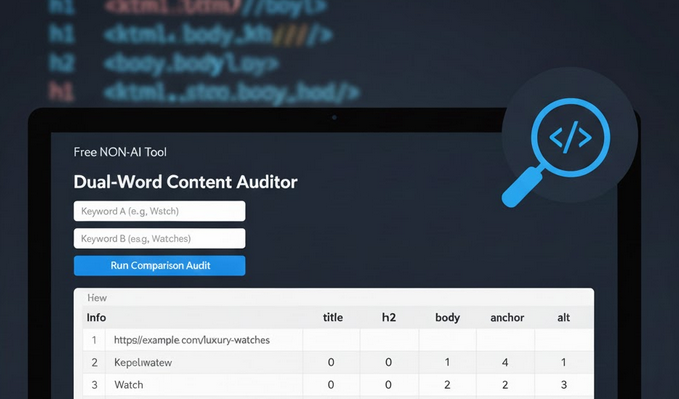
Solving the Singular/Plural Cannibalization Headache
Today I had a seemingly trivial task: run a keyword cannibalization audit for an e-commerce shop. Specifically, I needed to see how the site was balancing singular vs. plural versions of core product terms. It sounds simple, but I quickly hit a wall with the standard toolkit.
Here are some of the problems I had with Screaming Frog, for example (also possible I don’t know some neat tricks):
- N-grams – While it’s a powerhouse, it doesn’t make this easy. For example, when using n-grams, you have to look at results page by page. If you select all, you get a “total sum,” but no clear report showing every URL side by side. Plus, the reports are cluttered with extra links to the pages, which just get in the way.
- Custom Extraction – Setting this up in a standard crawler is a chore. You have to create separate conditions for every single element—Title, H1, H2, H3, H4, Alt text—one by one. It’s too much manual setup for a quick audit.
- Does not use “Exact Word” matching
I spent some time trying and searching, and decided that it would be faster for me to build one from scratch. I also want to share it with you if you need something this specific.
The Solution: The Dual-Word Content Auditor
Since what I needed didn’t exist, I built it—a fast, surgical auditor that does exactly what a content strategist needs during a cannibalization check.
Here is the link to the tool: https://dual-word-content-auditor.streamlit.app
How it works:
1. Bulk Upload: You drop in a list. It deduplicates the URLs and gets to work immediately. (Sorry – we restrict it to up to 100 URLs.)
2. Element-Specific Scanning: Instead of just “Body text,” it maps the word counts to the most important SEO areas:
- Meta: Title and Description (meta description not included in results here, as it seemed unnecessary).
- Hierarchy: Every heading from <h1> down to <h4>.
- Context: Anchor text (links) and Alt text (images).
3. Strict Logic: It uses “Exact Word” matching. If I’m looking for “Watch,” it won’t get confused by “Watching.” This is vital when you’re specifically trying to separate singular and plural counts.
The Result
Instead of a messy spreadsheet or a page-by-page click-fest, the tool produces a clean, structured table. It puts the URL first, followed by the specific counts for Keyword A and Keyword B.
You can see at a glance if a page meant for a “Singular” intent is accidentally dominated by “Plural” keywords in the H1s or Alt tags. It’s a level of precision that pro tools just don’t offer natively.

Marin Popov – SEO Consultant with over 15 years of experience in the digital marketing industry. SEO Expert with exceptional analytical skills for interpreting data and making strategic decisions. Proven track record of delivering exceptional results for clients across diverse industries.
Leave a Reply